

US Household Data Cleaning Project
- Jan 15, 2025
- 2 min read
Updated: Jan 23, 2025
In this project, I walk through the process of cleaning the raw US household data.
Link to Code: https://github.com/schuyler-b/portfolio/blob/main/USHouseholdIncome%20Data%20Cleaning.sql
BACKGROUND: Received the raw data from a client and needed to clean the data to be used in a Web Application.
PROCESS: Used MySQL to analyze the data, note and appropriately correct data inconsistencies, and normalize the data using processes shown below. First, let's take a look at the data:

We need to check for duplicates. Let's do this by running a count on the id which should be unique identifier:
SELECT id, COUNT(id)
FROM us_project.us_household_income
GROUP BY id
HAVING COUNT(id) > 1;
With this code, we can see that we have duplicates:

We need to remove duplicates which can be done with this code:
DELETE FROM us_household_income
WHERE row_id IN (
	SELECT row_id
	FROM (
		SELECT row_id,
		id,
		ROW_NUMBER() OVER(PARTITION BY id ORDER BY id) row_num
		FROM us_project.us_household_income) duplicates
	WHERE row_num > 1)
;
We can see no results, so our code worked.
Now let's check the statistics table for duplicates.
SELECT id, COUNT(id)
FROM us_household_income_statistics
GROUP BY id
HAVING COUNT(id) > 1;
Good! No duplicates.
Let's check the quality of the state name data.
SELECT DISTINCT State_Name
FROM us_project.us_household_income
GROUP BY 1
;
To fix this, we need to use the following code:
UPDATE us_project.us_household_income
SET State_Name = 'Georgia'
WHERE State_Name = 'georia'
;
This looks better.

While looking over the data, I noticed a blank here:

Let's fix that with the following code:
UPDATE us_household_income
SET Place = 'Autaugaville'
WHERE County = 'Autauga County'
AND City = 'Vinemont'
;
Which yields the following table results:

Finally, let's sort by Type with this code:
SELECT Type, COUNT(Type)
FROM us_project.us_household_income
GROUP BY Type
;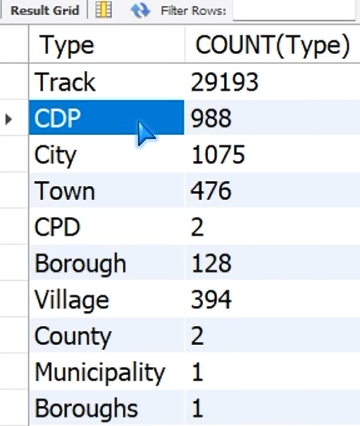
I want to combine boroughs and borough because this is a data entry error. I can do this with the following code:
UPDATE us_project.us_household_income
SET Type = 'Borough'
WHERE Type = 'Boroughs'
;
Thank you for following along. Have a great day!


Comments